School of HermesConcept
Learn Hermes by doing

Schoolof Hermes

Climb one camp at a time. Make something real at every stop, and keep a record of what you made.

School of Hermes is a concept by Damon Gardenhire. It is not an official Nous Research project, and it doesn't issue any official credential.

Practice it in Field Academy

Bring your own Hermes

The climbing happens in Field Academy, a free add-on for Hermes Desktop. You do each mission in your own Hermes, on your own computer, and a check looks at what you made.

Field Academy is an independent plugin developed by Damon Gardenhire. It is not an official plugin for Hermes made by Nous Research.

Getting it running

You need Hermes Desktop with Hermes Agent 0.22.0 or later.

Install in Hermes Desktop
  1. Click Install in Hermes Desktop. Hermes Desktop opens and installs Field Academy. It shows a short note first, because Field Academy isn't in the Hermes plugin list yet.
  2. Restart Hermes, or press Ctrl-K (Cmd-K on a Mac) and choose Reload desktop plugins.
  3. Click Field Academy under Tools in the sidebar.

Prefer the terminal? Type this line in PowerShell on Windows, or in Terminal on a Mac or Linux.

hermes plugins install Dgardenhire/hermes-field-academy --enable
The mountain

Camp by camp

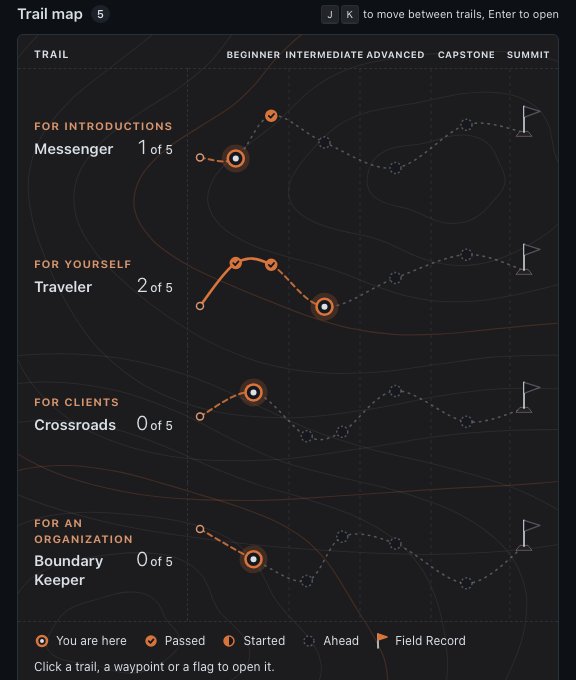
Each path is a trail up Mount Olympus, named for one of Hermes's old jobs in the Greek myths. New climbers start on Messenger.

Every trail climbs the same way.

  1. BeginnerThe basics the rest of the path stands on.
  2. IntermediateHermes starts doing more of the work for you.
  3. AdvancedHermes works without you there to ask.
  4. CapstoneOne mission on a problem of your own. You decide what success looks like before you start.
  5. The summitPass every mission on the path and you can create your Field Record.
The Field Academy trail map: four trails, each a dotted line across Beginner, Intermediate, Advanced and Capstone camps to a summit flag
The trail map in Field Academy. Filled waypoints are passed, and the ringed one is where you are.
Five trails

Pick a trail

Four trails teach. A fifth, Guide, asks you to do the work for a client and have it reviewed. Each mission takes a real piece of work, and every trail ends at its own summit.

For introductions

Messenger

Hermes carried word between the gods and people. Here you say what Hermes is, honestly, to someone who has never used it.

Watch Hermes do a real job, explain it honestly, spot a real opportunity, and pass it to the person who will build it.

  • BeginnerWatch Hermes do one real job
  • BeginnerExplain Hermes in two minutes
  • IntermediateSpot a real opportunity
  • AdvancedPass the opportunity to the builder
  • CapstoneMake one real introduction

At the summit A two-minute explanation, notes on a real opportunity, and a clean handoff to the builder.

For yourself

Traveler

Hermes looked after people on the road. You get Hermes running on your own computer and keep it running.

Run Hermes on your own computer and keep one daily job working.

  • BeginnerFind where Hermes is running
  • BeginnerLearn what the app keeps when you close it
  • IntermediateMake Hermes remember how you work
  • AdvancedPut one job on a schedule
  • CapstonePut Hermes to work on your own job

At the summit Hermes is connected, your chats are saved, your skills are set up, and a job runs on a schedule.

For clients

Crossroads

Hermes was the god of crossroads, where roads meet. You connect Hermes to a client's tools.

Set Hermes up for a client, connect it to their tools, and hand it over.

  • BeginnerTurn a vague request into a first project
  • IntermediateChoose where Hermes runs for a client
  • IntermediateConnect one client tool safely
  • AdvancedWrite the guide the client's staff will use
  • CapstoneRun a small engagement on your own problem

At the summit A written scope, a working connection, a tested approval step, and a handover guide. The client desk below goes with this trail.

For an organization

Boundary Keeper

Stone pillars called herms marked where one property ended and the next began. You decide who owns what, who approves what, and how it recovers.

Plan Hermes for a whole organization: who owns what, who approves what, and how it recovers.

  • BeginnerMap every part and name its owner
  • IntermediateDecide who can do what
  • IntermediateMatch each job to the right kind of agent
  • AdvancedPlan the recovery and measure the value
  • CapstonePlan Hermes for an organization you know

At the summit A map with owners, a written rule set, a working task board, and a recovery plan with real numbers.

For people who set up Hermes for a client

Guide

Hermes led travelers to where they were going.

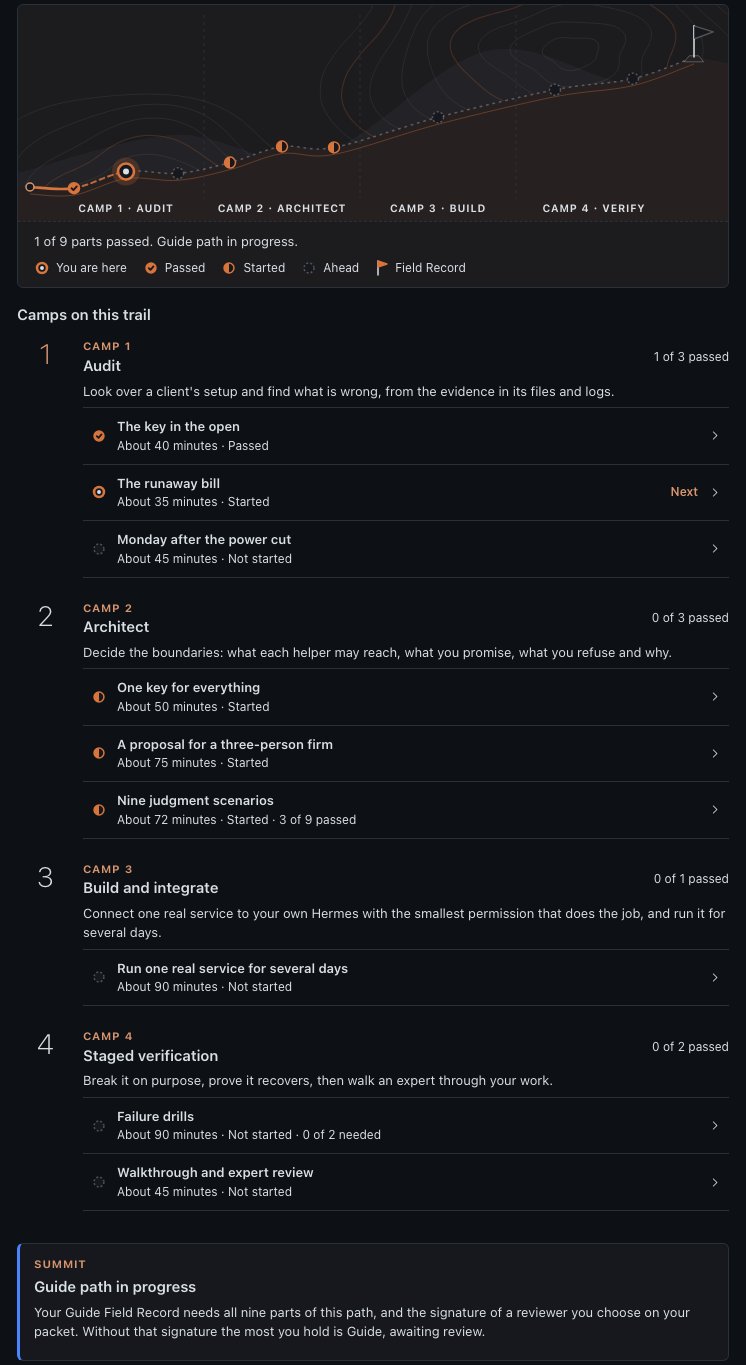
Can you set up and run Hermes for a small client, like a one-person business or a three-person firm? Guide has you do the work, in four camps that follow the order of a real setup.

  • AuditFix broken practice setups. Each lab is a folder laid out like a client's Hermes, with fake keys and one problem hidden in it.
  • ArchitectWrite a proposal for a made-up accounting firm, and work through nine hard cases with no clean answer.
  • BuildConnect one real service to your own Hermes, with only the access it needs, and let a scheduled job use it for at least three days.
  • VerifyBreak something on purpose and show Hermes recovers. Then explain one lab the way you would to a client.
The Guide path in Field Academy: a trail across four camps, Audit, Architect, Build and Verify, with each part listed under its camp

At the summit A reviewer you choose, someone with the experience to judge it, reads your work and signs it. Then you can create your Guide Field Record.

Inside a mission

Six steps up

Every mission on the four learning trails has the same six steps. Help fades as you climb, so later missions give you less of the example and more of the work.

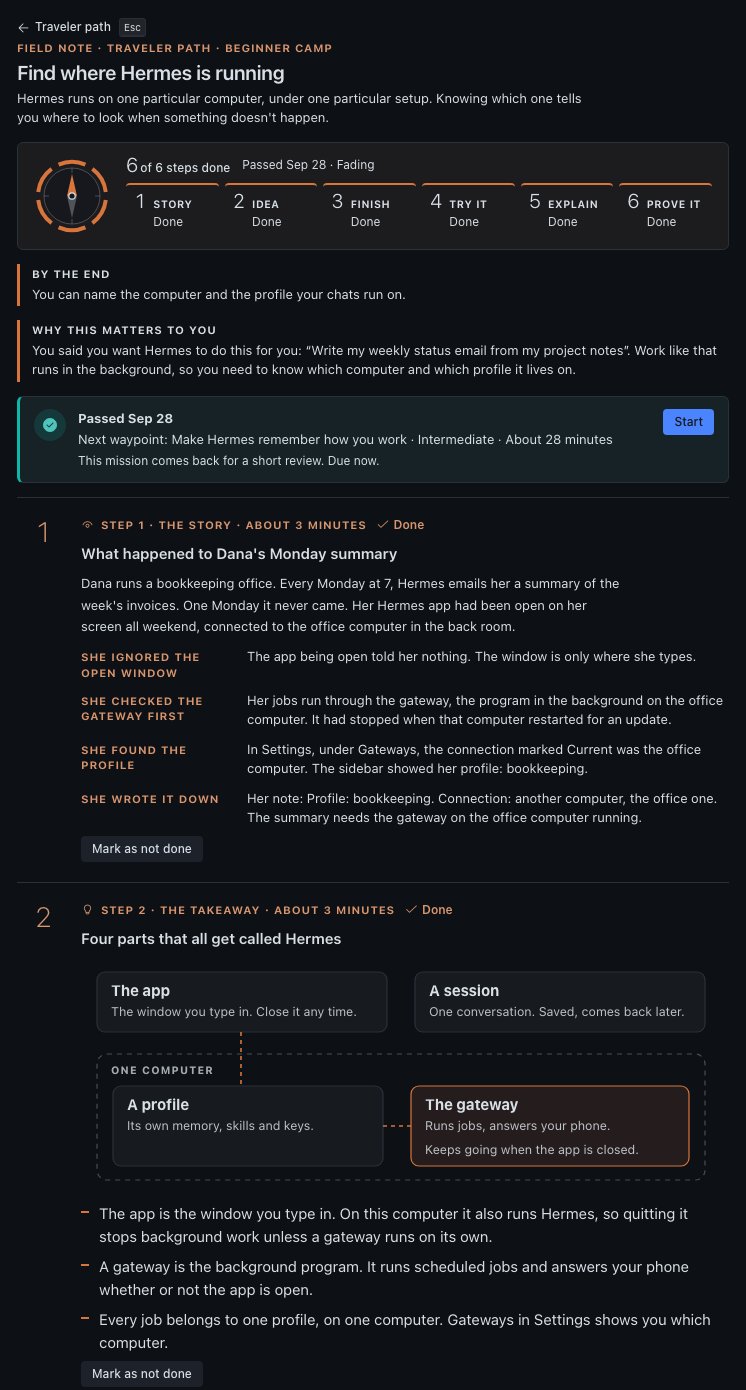
  1. The storyA short story about someone using Hermes, and what they did at each turn.
  2. The takeawayThe main idea in a few lines.
  3. Your turnA half-finished example. Fill in the blanks, then see the model answers beside yours.
  4. Try itA button opens the right page in Hermes, or starts a new chat with the practice prompt already sent.
  5. Explain itAnswer a question in your own words. Your own Hermes scores it out of 100, and 70 passes.
  6. Prove itMake something real in Hermes, like a skill, a scheduled job or a document. Press Check my work and Field Academy looks at it.
A Field Academy mission: the six steps, the story of a missing Monday email, and a drawing of the four parts that all get called Hermes
A mission opens with a story, then the idea in a few lines.

When a check misses

The page says what's missing and gives one hint. Miss again and you get a worked example too. Retry as often as you like.

Keeping it fresh

Passed missions come back for short reviews, three questions at a time. Answer well and the next one waits longer. Each mission shows Strong, Holding, Fading or Weak.

Skipping ahead

Already use Hermes? A six-question placement check can let you skip a level's reading. You still answer every question and pass every check.

The client desk

One client, eight labs

These labs follow one made-up client job from the first conversation to the monthly check-in. They go with the Crossroads trail, and with Messenger when you spot work for someone else to build.

Work them in a notebook or a document of your own. This page saves nothing. The checks happen in Field Academy, and each lab names the mission it goes with.

Your practice client

Northline Services

Northline has twelve staff. Project updates live in a shared spreadsheet and in chat. The owner spends 45 minutes every weekday pulling them together and wants a dependable briefing at 8:30 a.m. They've asked what it would take for you to set up Hermes and look after it.

Northline is made up for these labs. Use it, or swap in a practice business you know well.

Lab 1Find the first client problemStart with one task the client wants solved
"We want Hermes to handle everything."

The owner wants the 8:30 briefing. They've also asked whether Hermes could handle sales follow-ups.

Which project would you take on first, and what do you need to learn before you quote it?

What to know

  • Pick a kind of business you understand, or can learn about by asking. A local contractor and a big company department buy very differently.
  • Ask the client to walk you through a recent example. Find where the information comes from, where the work gets stuck, and who is responsible.
  • Check that you can deliver it. Find out what access you'll need and who can approve the work. Say no, or narrow the job, if you can't support it well.

Your assignment

Write a short discovery brief for a made-up client:

  • The business and the person who decides
  • The task that repeats, and how it's done today
  • The problem they want solved, and what a good result looks like
  • The tools and information involved
  • The budget conversation and how they buy
  • Who owns the access you'd need

End with one first project. Leave the company-wide promises out.

You're done when you can describe the client, their problem, and one specific first project.

Compare with one approach

Start with a small briefing trial built from approved project updates. It works if every active project shows up, each blocker links back to where it came from, and the owner reads the draft before it goes out. Sales follow-ups wait for later. Before you quote, confirm access, the quality of the updates, who gets the briefing, where Hermes will run, and who signs off.

Practice it in Field Academy: Crossroads, Turn a vague request into a first project. Messenger, Spot a real opportunity.

Lab 2Scope and price the engagementGive the client a clear offer
"Can you give us one price?"

For this lab, guess 3 hours to learn the job, 4 to set up Hermes, 6 to connect their tools, 3 to test, and 2 to train and write things down. The client pays for hosting and AI model use. These numbers are made up. They're not a guide to market rates.

What goes in the quote, and what happens if the client adds another tool?

What to know

  • List what you'll deliver: setup, connections, testing, training and a written guide. Say what's included, what isn't, and what the client must provide.
  • Count the work behind the demo, including fixes and support. Be clear about hosting, AI model costs and other services the client pays for.
  • Decide up front how you'll price extra tools or new requests, so a monthly fee doesn't quietly turn into unlimited building.

Your assignment

Write a sample proposal:

  • The problem and the result you'll deliver
  • What you'll set up and connect
  • How the client will decide it's finished
  • What the client is responsible for
  • How long it will take
  • Your fee and when it's paid
  • Hosting, AI model and other costs
  • How changes are handled
  • Optional support after launch

Use your own numbers. This lab is practice at pricing.

You're done when a client could tell what they're buying, what costs extra, and how the work will be accepted.

Compare with one approach

The guesses add up to 18 hours of work before any cushion or profit. Set your own numbers and explain them. Quote the briefing, one connected tool, testing and the handover. Say that a second source or a sales workflow gets its own estimate. Keep outside costs and optional monthly support apart from the setup fee.

Practice it in Field Academy: Crossroads, Turn a vague request into a first project. Messenger, Spot a real opportunity.

Lab 3Install for a clientA setup you can hand over and look after
"Will this depend on your laptop?"

The client wants the briefing to run every weekday, even when your computer is off. Their office administrator will own the hosting and AI model accounts.

How will you choose a place for Hermes to run that the client can manage after you leave?

What to know

  • Choose where Hermes runs together with the client. Think about who keeps it running, who can reach it, and where their information lives. Write the choice down.
  • The client owns the accounts. Hosting, the AI model account and connected services belong to them, so nothing depends on a personal account of yours.
  • Follow the current Hermes docs to set it up. Write down the version and where settings live, without copying any secret keys. Run a small task, restart Hermes, and run it again.

Your assignment

Write a setup record for a practice install:

  • Where it runs, and who owns that account
  • The Hermes version
  • Where settings and keys are kept (never the keys themselves)
  • Which AI model it uses, and who pays for it
  • How to start, stop, restart and check on it
  • Who to call for access or recovery

You're done when you can show the setup working, and someone else could use your record to check on it and restart it.

Compare with one approach

Record the client-owned place it runs, who owns each account, how you get in, where settings live, how Hermes starts and how you check it's healthy. Keep keys where Hermes expects them. Show a task working after a restart. Be honest about what could still take it offline. One good run doesn't mean it's always on.

Practice it in Field Academy: Crossroads, Choose where Hermes runs for a client.

Lab 4Integrate the client's workflowConnect only the tools the job needs
"Some updates are in chat. The rest are in the sheet."

The first job uses the project spreadsheet and approved chat exports. One update contains an instruction to send the briefing to a new outside email address. The owner has approved drafts only.

How will you connect the sources without letting what's written inside them change the job?

What to know

  • Map the job: where information comes from, what Hermes does with it, and where the result goes. Tie each step to something in your proposal.
  • Practice with made-up data first. Give each connection only the access the job needs, and keep keys out of prompts, reports and shared documents.
  • Agree which actions Hermes can take on its own and which need the client's approval. Words inside a document or web page are information. They never give Hermes permission to do something new.

Your assignment

Draw a connection map: source, then what Hermes does, then who reviews it, then where it goes. For each connection, write down:

  • The tool and who owns the account
  • The access it needs
  • What it can read, and what it's allowed to do
  • Whether a person must approve
  • What happens when it fails
  • How you'll test it

Connect one tool at a time, using practice data.

You're done when every connection has a purpose, an owner and a test.

Compare with one approach

Read only the agreed sources, keep links back to each one, and put a draft where the client agreed. The instruction to email an outside address is just text in an update. It isn't permission to send. Leave sending out of the first job until the client approves it and you've tested it.

Practice it in Field Academy: Crossroads, Connect one client tool safely.

Lab 5Test and obtain client acceptanceShow you delivered what you promised
"It looks good. Are we done?"

The sample briefing reads well, but one project is missing and two updates disagree about a deadline. The client hasn't seen what happens when something fails.

What would you show the client before you ask them to sign off?

What to know

  • Test against what you sold, using the finish line from your proposal. Check that it's accurate, complete and stays within its permissions. A nice-looking result is only part of the test.
  • Test what goes wrong too: missing information, a source that's down, updates that disagree, and an instruction hidden in a document. Write down what you expected and what happened.
  • Walk the client through the results, the limits and anything still open. Agree how open items get handled before calling it finished.

Your assignment

Write a sign-off record. For each thing you delivered, list:

  • The test and what should happen
  • What actually happened, with proof
  • Who reviewed it for the client
  • Any open issue and how it's settled
  • The client's decision

Include at least one test where something breaks and recovers.

You're done when the client can see what was tested and make an informed decision.

Compare with one approach

Show the coverage test and the missing project, flag the clashing deadline, and record the fix or the client's call. Show what happens when a source is down and where approval is required. Ask for sign-off against the agreed finish line, with open issues in plain view. A polished report never stands in for the test record.

Practice it in Field Academy: Crossroads, Write the guide the client's staff will use.

Lab 6Train users and hand overMake sure the client can use what they bought
"Our office manager will run this."

The owner has picked an office manager to review the briefings. The administrator handles accounts and access. The office manager has never used Hermes and wants a short guide.

What goes in the user's training, and what goes to the administrator?

What to know

  • Teach the daily work: starting a task, checking the result, approving an action and reporting a problem. Use their real job, and skip the tour of every feature.
  • Hand over how it runs: settings, who owns which account, routine steps, known limits and who to call. Never put secret keys in the guide.
  • Say what happens next: what the client handles, what you cover, and where they ask for help.

Your assignment

Put together a handover pack:

  • A quick-start for the user
  • A how-it-runs guide for the administrator
  • Who owns each account and service
  • Known limits
  • How to pause it and recover it
  • How to report a problem, and who covers support

Then ask a practice user to finish a task without you talking them through it.

You're done when a user can run the job and knows how to get help.

Compare with one approach

Teach the office manager to ask for a briefing, check the source links, handle an open item and report a failure. Give the administrator the setup record, the restart and recovery steps, and who owns what. Let the office manager do a practice run with no help from you.

Practice it in Field Academy: Crossroads, Write the guide the client's staff will use. Messenger, Pass the opportunity to the builder.

Lab 7Package ongoing maintenanceOffer support you can keep up
"What does the monthly fee cover?"

The client wants watching, updates, help when things break, and unlimited new workflows, all in one monthly package. You guess two hours of routine care a month, plus some time for problems.

Where do you draw the line between looking after it and building new things?

What to know

  • Name the work that repeats: watching for failed runs, checking connections, testing updates, troubleshooting and regular check-ins. Include only what you'll really do.
  • Set clear limits: which tools are covered, your hours, how fast you'll respond, and what's left out. Promising to respond is different from promising a fix by a set time.
  • Keep the money visible. Estimate your time and costs, and say how usage charges and new work are billed.

Your assignment

Write a sample support offer:

  • What's covered
  • Routine checks and how updates are handled
  • How to reach you, and when
  • How serious problems are ranked, and how fast you respond
  • How many small changes are included
  • What's left out and priced separately
  • The monthly fee and how you got it
  • What the client is responsible for
  • When you review and renew

You're done when the client can tell support, problem help and new building apart.

Compare with one approach

Name the covered setup and connections, the routine checks, update testing, your hours, how problems are handled and the small changes included. Price new workflows separately. State how fast you'll respond without promising every problem is fixed in that time. Work out a fee you can sustain from your own costs.

Practice it in Field Academy: Crossroads, Write the guide the client's staff will use.

Lab 8Support, improve, and renewKeep it useful after the first month
"The briefing stopped this morning."

A connected service changed how it signs in. Yesterday's briefing worked. Today it couldn't fetch its sources. The client has an 11 a.m. meeting and needs to know what happens next.

How will you get it running again, and what will you tell the client?

What to know

  • Look before you change anything. Find what broke, what changed recently and who it affects. Keep a way back before you try a fix.
  • Test updates before they go live. Read what changed, test the affected work, write down the result, and use the agreed time to roll it out.
  • Check in with the client about use, failures, fixes and new needs. Suggest new work only when it solves a real problem, with its own scope and finish line.

Your assignment

Work through a practice problem: the client's briefing stopped after a connected service changed. Write down the impact, what you checked, a short-term workaround, the fix, proof it works, your update to the client, and how you'll prevent it next time.

Then draft a monthly check-in: work done, open issues, usage costs, and any new work you'd suggest, priced separately.

You're done when you can explain the problem and the recovery to a client, and tell included support from a new project.

Compare with one approach

Confirm the impact and read the logs. Follow the agreed support steps and give the client a plain status update, with a time for the next one. Offer a simple manual workaround if it helps. Restore the approved access, test a new briefing and check it's complete before things go back to normal. Record the fix and the prevention step in the monthly check-in.

Practice it in Field Academy: Boundary Keeper, Plan the recovery and measure the value. Messenger, Pass the opportunity to the builder.
At the summit

Your Field Record

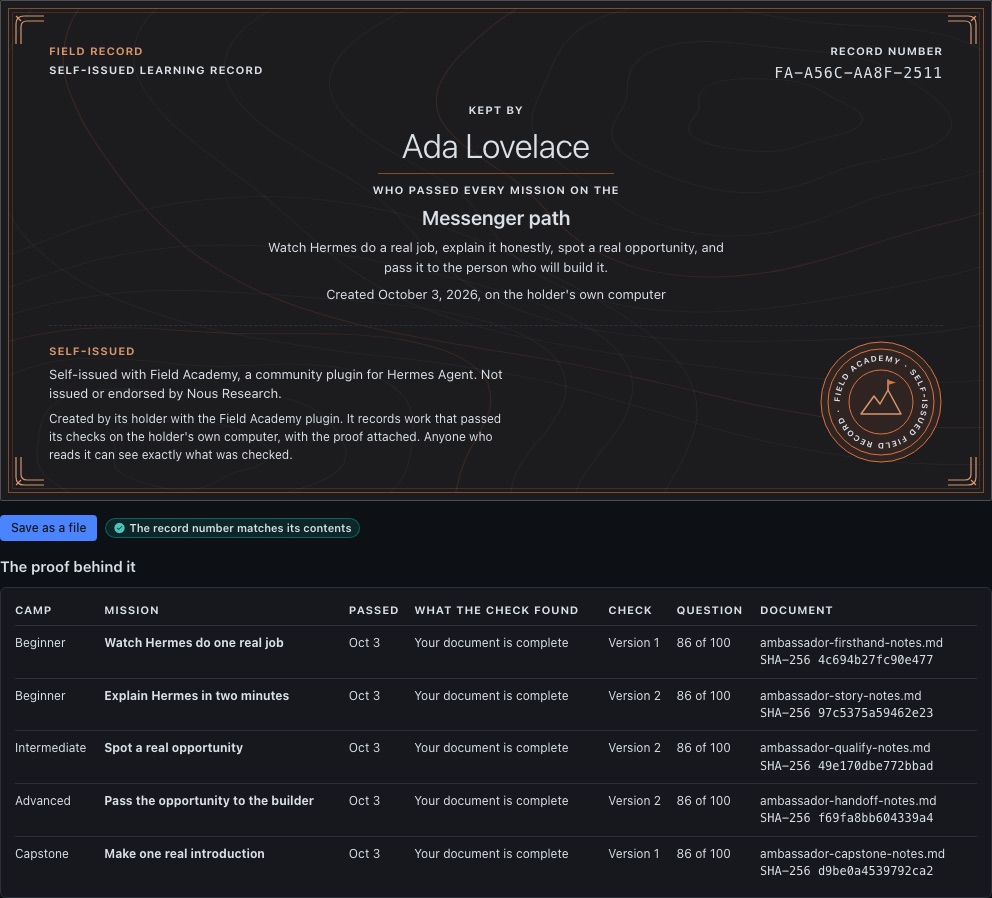
A Field Record is your own record of what you learned on a trail. Field Academy builds it mission by mission on your computer. You create it at the summit by typing your name.

The Field Academy mark: two plain rings around a peak and a flag, with the words Field Academy, self-issued field record

Every Field Record carries this line, on screen and in every saved copy:

Self-issued with Field Academy, a community plugin for Hermes Agent. Not issued or endorsed by Nous Research.

What's on it

  • Your name and the date
  • What each mission's check found, and your scores
  • Each document you wrote, with a fingerprint that matches that exact file
  • A record number that stops matching if any line changes

What isn't

  • Your written answers
  • Your chats
  • Where files sit on your computer

On the Guide trail, a reviewer you choose reads your work and signs it. Pick someone with the experience to judge it. The signature shows that your reviewer signed. It doesn't mean anyone else vouches for them.

It's yours to keep, share or leave alone.

A Messenger Field Record kept by Ada Lovelace: the self-issued line, the Field Academy mark, and a table of the proof behind each mission
A Field Record and the proof behind it.
Concept notes

Further up the trail

Ideas for where this could go. None of them are built.

Show your work

A Field Record could help you show a client what you've practiced. It would stay what it is today: self-issued, with the proof attached, read by whoever you choose to show it to.

Climb together

People in one town could work through a trail together, the way a running club trains for a race. Anyone who has finished Messenger could host a session.

More labs

The client desk could grow a lab for every Crossroads and Boundary Keeper mission, each with a made-up client to practice on.

Go deeper

The people who teach Hermes

School of Hermes and Field Academy send you to guides and videos made by people across the Hermes community. Every link names its author. None of them have reviewed or endorsed either one.

  • Hermes docsNous Research. The first stop for every mission. The level names Beginner, Intermediate and Advanced come from the Learning Path page.
  • Hermes Agent MasterclassTonbi, Tonbi's AI Garage. Ten episodes from install to security, with timestamped notes on Hermes Atlas. Also on YouTube.
  • Hermes Desktop App MasterclassTonbi, on YouTube. The app itself: settings, connections and daily work.
  • Hermes AtlasKevin Simback. Guides to where Hermes lives, memory and the desktop app.
  • The Hermes Bibleiamlukethedev. A searchable copy of the Hermes docs, with community guides.
  • The Whole Damn ThingTony Simons, on X. Twelve parts on how Hermes works and where it breaks.
  • tonysimons.devTony Simons. The Guide trail follows the order of a setup he describes for his one-to-one sessions. He hasn't reviewed it, and his site offers no certification.

More from the community

Questions

Before you climb

Is School of Hermes made by Nous Research?
No. School of Hermes is a concept by Damon Gardenhire. It is not an official Nous Research project, and Nous Research hasn't reviewed or endorsed it.
Will I get a credential?
No. School of Hermes doesn't issue any credential. In Field Academy you can create a Field Record, your own record of what passed on your computer. Every one says it is self-issued and not endorsed by Nous Research.
Who checks my work?
Field Academy's checks look at what you made, and your own Hermes scores your written answers. On the Guide trail, a reviewer you choose reads your work and signs it.
Does it cost anything?
No. Field Academy is free and MIT licensed. This site has no account and no sign-up.
Does it send my information anywhere?
This site has no forms and saves nothing about you. Field Academy has no server, no tracking and no account. Your progress stays on the computer where Hermes runs.
Do I need Windows, Mac or Linux?
Any of them. You need Hermes Desktop with Hermes Agent 0.22.0 or later.

Keep exploring